Best FlutterFlow Alternatives for Non-Technical Founders
Frustrated with FlutterFlow's complexity? We tested 5 simpler alternatives and shared which ones actually work for non-technical founders & operators.

We hear this story constantly from founders. They started with FlutterFlow thinking it would be simple to build their app without code. Three weeks later, they're drowning in tutorials about state management and custom widgets, wondering why "no-code" feels so technical.
While FlutterFlow is undeniably powerful, many non-technical founders find themselves overwhelmed by its complexity. The platform was built with Flutter developers in mind, and it shows. What you need is something that actually prioritizes simplicity over power.
Obviously, we're going to recommend Avid in this guide. We built it for founders frustrated with FlutterFlow's complexity. But we want to be genuinely helpful here, so we'll cover other alternatives with complete honesty.
If Avid isn't right for your situation, you should know what other options exist and why you might choose them instead.
Why Founders Look for FlutterFlow Alternatives
Before we dive into the alternatives, let's be honest about why FlutterFlow might not be working for you. It's not a bad platform, but it has some real challenges for non-technical founders.
- It’s low-code, not no-code: Flutterflow can be hard to figure out when you have zero technical knowledge. Even if you’re not writing Dart code directly, you're still thinking in developer terms about state management, widget trees, and navigation flows. Many non-technical founders report spending weeks just getting comfortable with FlutterFlow's interface and concepts.
- Decision fatigue kills progress: Every simple task in FlutterFlow requires multiple decisions. Want to add text? Choose the widget type, set styling properties, configure responsive behavior, handle overflow, set accessibility labels. The decision overwhelm can be paralyzing, especially when you’re not a developer.
- Learning time vs building time: Perhaps the biggest frustration is the time investment with unclear returns. You spend weeks learning FlutterFlow, but your app still isn't ready for users. Meanwhile, competitors who chose simpler tools are already testing with real customers and iterating based on feedback. The opportunity cost is real. Every day spent in tutorial mode is a day you're not building your business. That's time you could have spent talking to customers, refining your idea, or actually launching your app.
Our Criteria for Evaluating FlutterFlow Alternatives
To help you find the right alternative, we evaluated each platform based on what actually matters to non-technical founders. Here's our framework:
- Learning Curve: How quickly can you go from sign-up to building something useful? We timed ourselves and noted any moments of confusion or frustration.
- Mobile-Native Feel: Does the final app actually feel like a mobile app, or like a website squeezed into an app wrapper?
- Speed to Market: How fast can you go from idea to something you can show users? We built the same simple app on each platform.
- Ease of Use For Non-Technical People: Is the interface designed for developers or non-technical users? We looked at language, complexity, and assumed knowledge.
- Cost Efficiency: Does the pricing make sense for bootstrap budgets? We considered both obvious and hidden costs.
- No-Code Reality: Is it actually no-code, or is it "low-code in disguise"? We noted anywhere we needed technical knowledge or custom code.
How We Evaluated These Alternatives
We tested each platform using the same prompt. For each app, we only used this single prompt with zero follow-ups.
Build a simple mobile app called Habit Hero that helps users build better daily habits.
Core features:
- Users can add new habits (e.g., “Drink water,” “Read 10 pages,” “Go for a walk”).
- Each habit shows a daily check-in button to mark it done.
- Show a streak counter for each habit (number of consecutive days completed).
- A dashboard/home screen that lists all habits and their current streaks.
- A motivational quote or message appears at the top of the dashboard each day.
Design style: clean, minimal, bright colors, friendly fonts, and emoji icons for each habit.
Output goal: A working mobile app preview or prototype that lets me add habits, check them off daily, and view streaks.
We paid attention to friction points where non-technical founders typically get stuck. These moments matter because they're where people give up.
- Learning Curve: Could someone start building something useful within an hour? Did they need tutorials first or could they figure it out intuitively?
- Mobile Feel: Did the output actually feel like a mobile app when tested on real devices? Not just "mobile responsive" but genuinely native-feeling?
- Speed to Working Prototype: How fast could someone get to something they could show potential users? Not a finished product, but a testable concept.
- Genuine Simplicity: Was the interface actually simpler or just different? Some platforms hide complexity behind menus, which doesn't really help.
- No-Code vs Low-Code: Did the tool assume users were developers? Can someone with zero coding knowledge successfully build a useful app?
Top 5 FlutterFlow Alternatives for Non-Technical Founders
1. Avid - The AI-Powered Mobile App Builder ⭐ Editor's Choice
Prompt Test
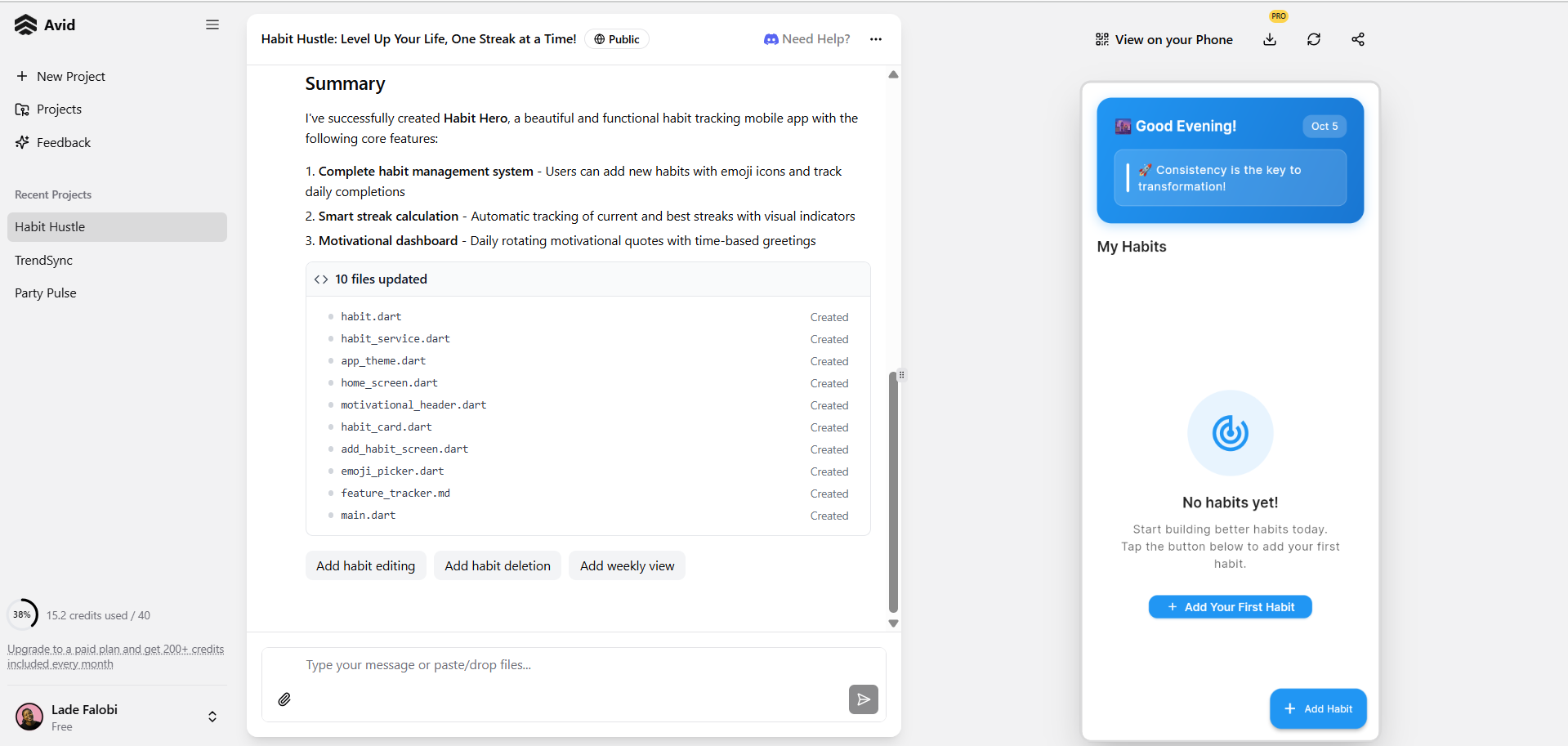
The interface looked clean and I liked the empty state. It was easy to figure out what to build next because Avid had pre-suggested prompts to guide me.
I was able to navigate the app, create a new habit, and download the mobile app I’d created.
Check out the app I created with Avid
Quick Summary:
- ✅ Zero learning curve - describe your app, AI builds it
- ✅ Mobile-native Flutter apps from day one
- ✅ No tutorials or documentation needed
- ✅ Built specifically for non-technical founders
- ✅ Days to launch, not months
- 💰 Pricing: Free tier. Paid tiers starting at $20/month
- 🚀 Best For: Founders who want to build fast without technical complexity
We built Avid specifically for founders frustrated with FlutterFlow's complexity. Instead of learning an interface, you describe your app in plain English and AI builds it.
What makes our approach different
Most platforms still make you think like a developer even if you're not writing code. Avid lets you think like a founder. You focus on what your app should do for users, not how to configure widgets and manage state.
You describe a fitness tracking app in a few sentences. Our AI generates screens for logging workouts, viewing progress, setting goals. It's not perfect initially, but it's 80% of what you want without any technical configuration.
Unlike other tools, we didn’t add AI as an afterthought to an existing platform. Our AI generator is our primary offer, so we work hard to constantly improve it.
The mobile experience we deliver
Avid generates actual Flutter apps, just like FlutterFlow. The difference is you don't need to understand Flutter concepts to get good results. Our AI handles mobile-specific optimizations automatically.
The AI understands common app patterns and mobile best practices, so you don't need to learn them yourself.
Ease of use
This is where Avid really shines. There's literally no learning curve. If you can describe your app idea in a conversation, you can build it with Avid. No drag-and-drop interfaces to master, no component libraries to understand, no state management to configure.
How fast you can actually move
Our users typically go from idea to working prototype in hours, not weeks. Most of that time is spent refining their description of what they want, not learning how to use development tools.
Where we fall short
We're newer, so there's less community content available. No big library of tutorials or templates like more established platforms have.
You also have less control over technical implementation details. But if you’re technical and want deeper customisation, you can export the source code and make changes yourself.
Who should consider Avid
Non-technical founders who want to focus on their business instead of learning app development. If you'd rather spend time understanding your customers than configuring user interfaces, our approach makes sense.
Our AI works best when you can clearly articulate what you want your app to do. If your idea is still fuzzy, you might benefit from the more hands-on process that other tools provide.
Pros
- Fastest path from idea to working app
- Zero technical knowledge required
- Mobile-native Flutter output
- Built for founders, not developers
- No complex interface to master
Cons
- Newer platform with smaller community
- Less control over technical implementation details
- No third-party integrations yet
2. Bubble - Powerful But Still Complex
Prompt Test
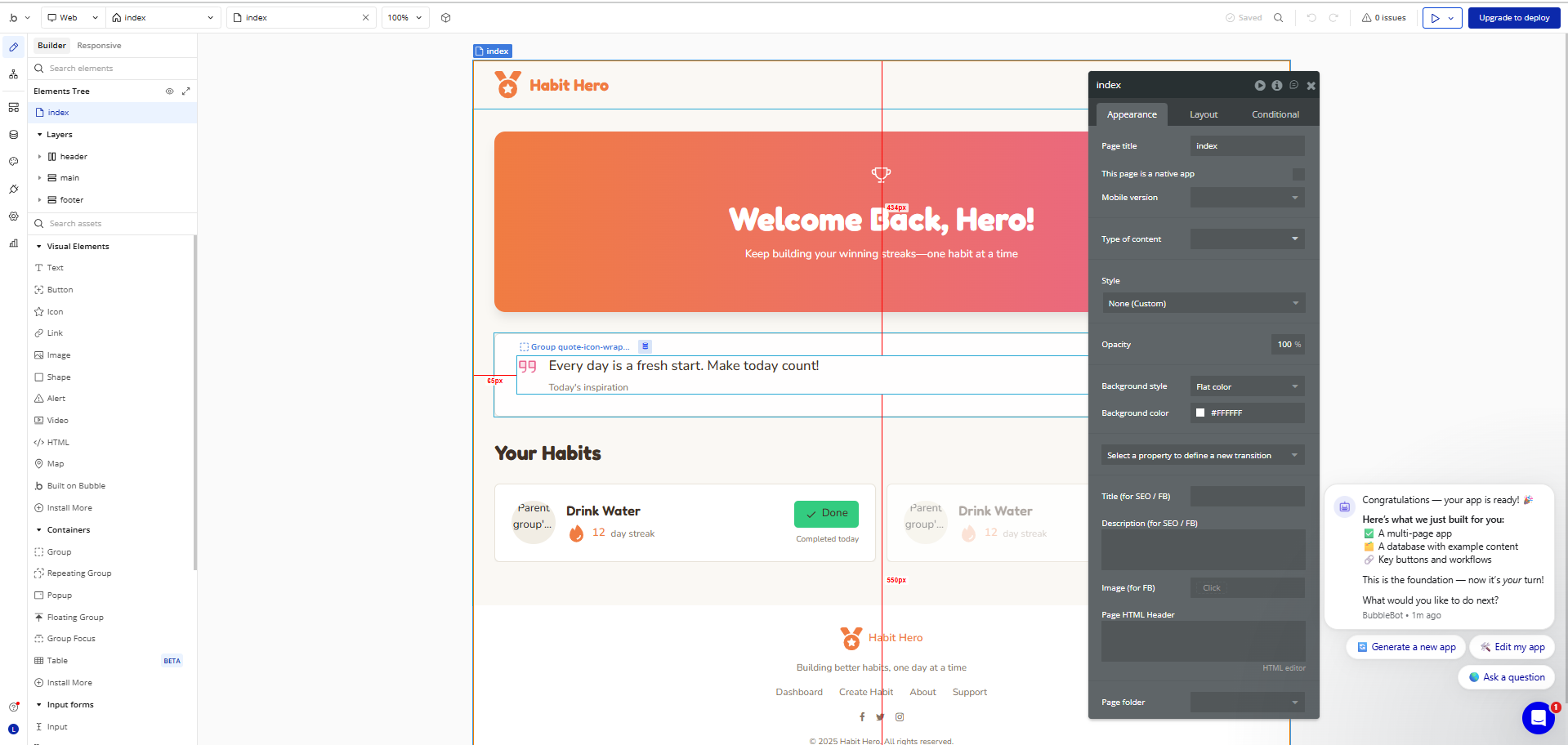
The generated app looked great, but to make further changes, Bubble required that I use their drag and drop functionality. The interface was overwhelming and I felt decision paralysis trying to figure out what to do next.
When I tried to use the built app, the functionality didn’t seem to be working fully. For example, I was unable to successfully create a new habit or mark an habit as “Done.”
Check out the app I created with Bubble
Quick Summary:
- ✅ Very powerful and flexible
- ✅ Large community and resources
- ✅ AI generator added
- ❌ Steep learning curve (similar to FlutterFlow)
- ❌ Web-first, mobile second
- 💰 Pricing Free plan available, paid from $32/month
- 🚀 Best For Founders who want to build SaaS or internal tools
Bubble is the granddaddy of no-code platforms, and it shows in both good and challenging ways. It's incredibly powerful and has a massive community, but it also inherits some of the complexity issues that frustrate FlutterFlow users.
The maturity advantage
Bubble has thousands of tutorials, templates, and plugins. Whatever you want to build, someone has probably done something similar. The community knowledge base is massive.
You can find detailed guides for almost every feature you might want to implement. The documentation is thorough (sometimes overwhelmingly so).
But the complexity remains
Learning Bubble takes just as long as learning FlutterFlow, maybe longer. The concepts are different but equally abstract. Workflows, data types, privacy rules, responsive design principles.
You'll spend days just understanding how Bubble's database system works before building anything with proper functionality.
The mobile limitation
This is Bubble's biggest weakness for mobile app founders. Bubble creates responsive web applications that work on mobile browsers. They can be packaged as apps, but they don't feel native.
Pros:
- Very powerful and flexible platform
- Massive community with thousands of tutorials
- Extensive plugin marketplace
- Strong database capabilities
- AI features added
- Free plan available for testing
- Mature platform with proven track record
- Can handle complex business logic
Cons:
- Steep learning curve (2-3 months to proficiency)
- Creates web apps, not native mobile apps
- Mobile experience feels like a website
- Complex workflow system to master
- Can be overwhelming for simple apps
- Database setup requires planning
- Performance can be slow on mobile devices
3. Adalo - The Template-Heavy Builder
Quick Summary:
- ✅ Pre-built templates and components
- ✅ Simpler than FlutterFlow
- ❌ No AI generator
- ❌ Limited customization options
- ❌ Apps can look template-based
- 💰 Pricing From $45/month
- 🚀 Best For Founders who prefer templates over custom design
Adalo takes a template-first approach to app building. Instead of starting from a blank canvas, you choose from pre-built app templates and customize them to fit your needs.
The template approach
This is Adalo's main selling point. Instead of figuring out how to build a dating app from scratch, you start with a dating app template and modify it. This reduces the learning curve and gets you to a working app faster.
Easier than FlutterFlow
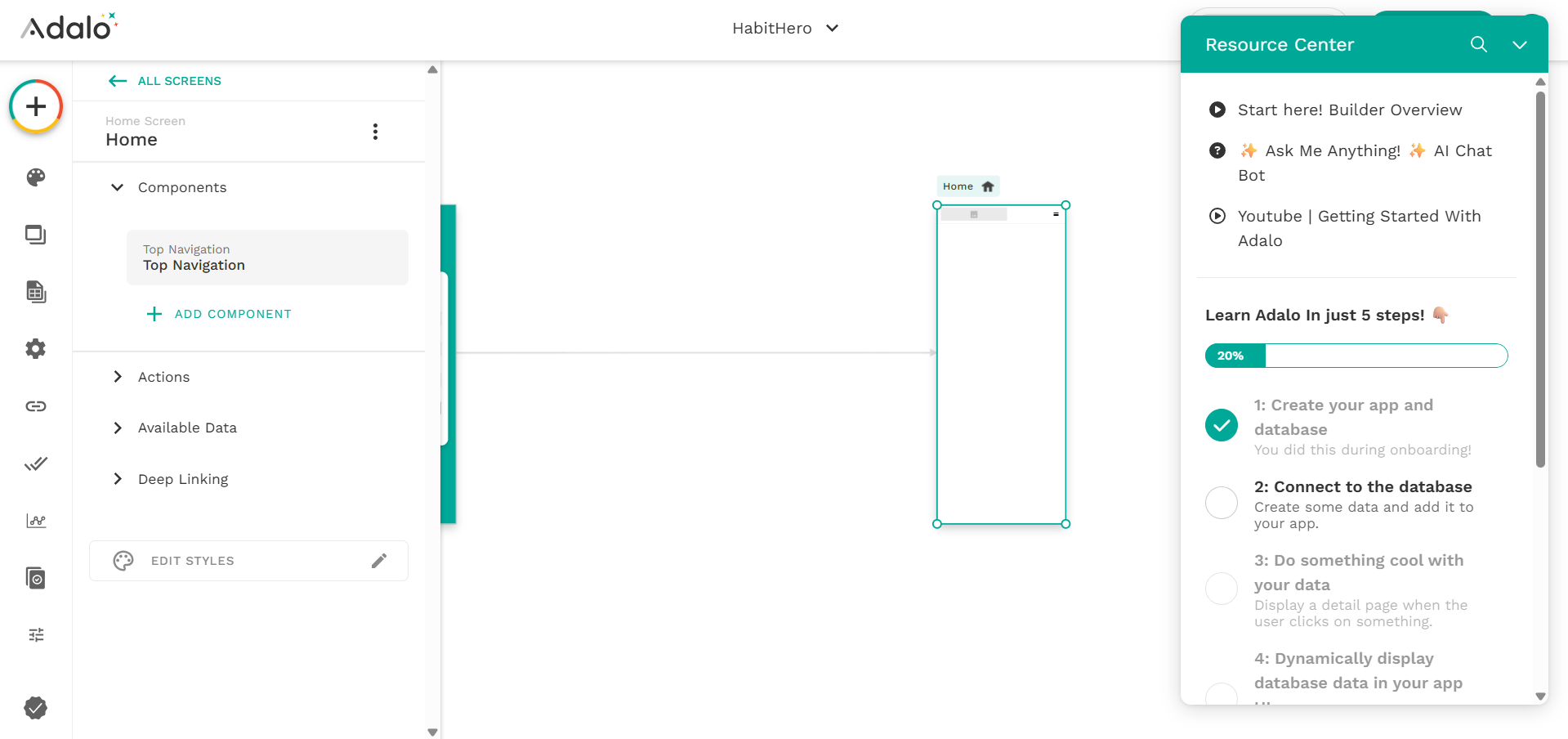
The interface is definitely more beginner-friendly than Flutterflow. The template structure gives you guardrails that prevent many of the mistakes that frustrate new FlutterFlow users.
Customization limits
The downside of the template approach is flexibility. If your app idea doesn't fit neatly into one of Adalo's templates, you’re stuck with decision paralysis and blank-canvas syndrome.. Custom functionality often requires workarounds that can be just as complex as FlutterFlow.
Publishing and deployment
Adalo handles app store publishing, which is a nice bonus. This is often a stumbling block for founders using other platforms.
Pros:
- Pre-built templates for common app types
- Good for beginners with clear structure
- Handles app store publishing
- Native mobile app output
- Drag-and-drop components
- Reasonable learning curve
Cons:
- Limited customization beyond templates
- Apps can look template-based or generic
- Database limitations for complex apps
- Fewer integrations than larger platforms
- Template dependency can be restrictive
- Custom functionality often requires workarounds
4. Thunkable - The Visual Programming Platform
Prompt Test
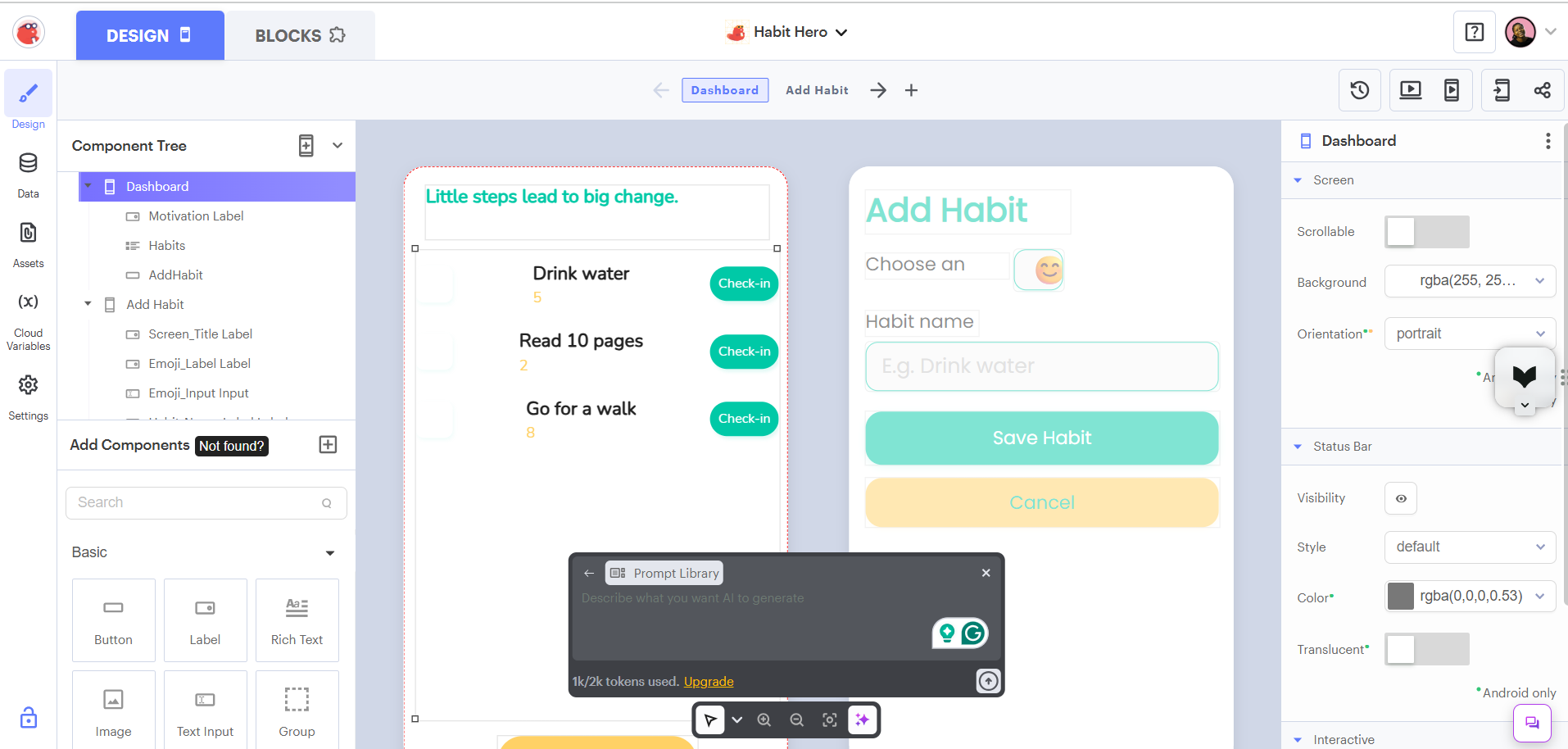
The user interface of the generated app didn’t look great. When I tested the buttons, I found that the app was not functional yet and only a frontend had been generated.
Unlike with Bubble, I had the option to send more prompts to edit my app, which was great. However, my initial prompt cost 1k out of the 2k free tokens that were assigned to me, which means the free tier is more limited than most others on this list.
In general, it seemed like I could only get better results with Adalo if I used their drag-and-drop feature (not their AI generator).
Quick Summary:
- ✅ Visual programming approach
- ✅ AI generation features
- ✅ Good mobile app output
- ❌ Free tier has very few AI tokens
- ❌ Still requires logic thinking
- ❌ Learning curve exists
- 💰 Pricing Free plan available, paid from $59/month
- 🚀 Best For Founders comfortable with logic flows
Thunkable uses a visual programming approach where you connect blocks to create app functionality. Think of it like building with LEGO blocks, but for app logic.
Visual programming
Instead of writing code, you drag and drop logic blocks and connect them together. This is more intuitive than text-based coding, but still requires you to think through the logical steps of how your app should work.
Mobile output
Thunkable creates real native apps that feel good on mobile devices. The performance and user experience are solid, especially compared to web-based solutions.
Still requires logic
While you're not writing code, you still need to understand programming concepts like variables, functions, and conditional logic. If these concepts intimidate you, Thunkable might not solve your FlutterFlow complexity issues.
Pros:
- Visual programming is more intuitive than code
- Creates real native mobile apps
- Good performance and mobile feel
- Free plan available for testing
- Active community and tutorials
- Cross-platform (iOS and Android)
- No coding knowledge required technically
Cons:
- Still requires logical programming thinking
- Learning curve for visual programming concepts
- Can become complex for advanced features
- Interface can feel cluttered
- Limited compared to native development
- Debugging visual logic can be challenging
- Some advanced features require paid plans
5. Glide - The Spreadsheet App Builder
Prompt Test
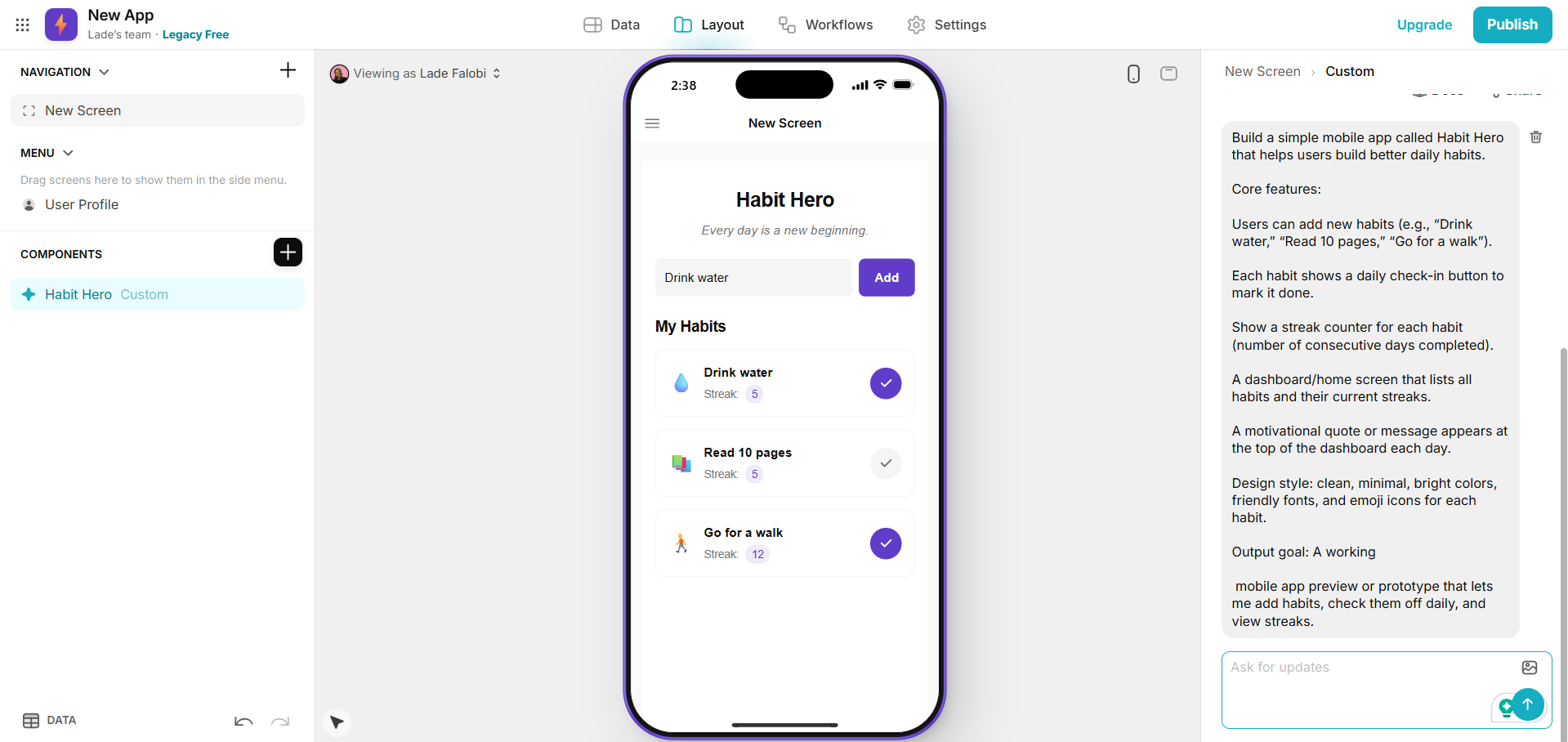
I had to chat with Glide’s support team to find their AI builder feature. I’d typed the prompt at sign-up but after logging in, no screens were generated and my prompt was discarded.
When I tried out the AI generator, the UI output looked great. However, like with some other tools on this list, the AI generated the frontend only, with no actual functionality. To enable functionality, it appeared I’d have to figure it out manually.
Check out the app I created with Glide
Quick Summary:
- ✅ Super simple - builds apps from spreadsheets
- ✅ Very fast initial setup
- ✅ AI app generator
- ❌ AI generates frontend (screens) only, no functionality
- ❌ Limited to data-driven apps
- 💰 Pricing Free plan available, paid from $25/month
- 🚀 Best For Simple data apps and internal tools
Glide has the most unique approach on this list. Instead of building apps from scratch, you connect a Google Sheet or Airtable base, and Glide automatically creates an app interface for your data.
Simplicity wins
If your app is primarily about displaying and collecting data, Glide is incredibly fast. You can literally have a working app in under an hour. No complex interfaces to learn, no components to configure.
Data-driven focus
This is both Glide's strength and limitation. It excels at apps that are essentially mobile-friendly database interfaces. Think employee directories, product catalogs, or simple booking systems.
Mobile feel
Glide apps feel more like mobile websites than native apps. They work fine on mobile devices, but users can tell they're not "real" apps. For internal tools, this might not matter. For consumer apps, it could be a problem.
Pros:
- Extremely fast setup (apps in hours)
- No learning curve if you know spreadsheets
- Great free plan available
- Perfect for data-driven applications
- Automatic sync with Google Sheets or Airtable
- Good for internal tools and simple apps
- Clean, modern interface design
Cons:
- Limited to data-centric applications
- Apps feel more like mobile websites
- Not suitable for complex interactions
- Limited customization options
- Depends on external data sources
- Less "app-like" user experience
- Publishing limitations on free plans
FlutterFlow Alternatives Comparison
Here's how these alternatives stack up across the factors that matter most to non-technical founders:
| Features | Bubble | Avid | Adalo | Glide | Thunkable |
|---|---|---|---|---|---|
| Free Tier? | ✅ | ✅ | ✅ | ✅ | ✅ |
| Lowest Paid Tier | $32 | $20 | $45 | $25 | $59 |
| Highest Paid Tier | $399 | $100 | $250 | $249 | $189 |
| Mobile Apps | ✅ | ✅ | ✅ | ✅ | ✅ |
| Speed to MVP | Slow | Fastest | Medium | Fast | Medium |
| AI Generator | Frontend only | Fullstack (front+backend) | ❌ | Frontend only | Frontend only |
| Code Export | ❌ | ✅ | ✅ | ❌ | ✅ |
| Best For | Complex web apps | Mobile app MVPs | Drag-and-drop mobile apps | Internal tools & dashboards | Native mobile apps |
Key Takeaways
- Avid: Best for speed and simplicity. Has AI-powered building and Flutter app output
- Bubble: Best for complex web applications. Has large community and steep learning curve
- Adalo Best for template-based apps. Has limited customization
- Glide Best for data-driven apps. Has spreadsheet integration and fast setup
- Thunkable Best for visual programming. Great native mobile apps, logical thinking required
How to Actually Choose
After testing all these options, here's how I'd think about choosing one.
#1. Start With Your Actual Constraints
If time is your biggest constraint: Choose Avid or Glide. Avid for mobile apps, Glide for data-driven applications. Both get you to working prototypes fastest.
If money is the primary issue: All the tools in this list have free tiers. When it comes to paid tiers, Avid & Glide have the lowest pricing.
If you want maximum control: You might need to accept complexity. Choose Bubble for web-focused apps or stick with FlutterFlow for mobile.
#2. Be Honest About Your Technical Comfort
Some founders enjoy learning technical tools. Others just want to build their business. There's no right answer, but you should be honest about which type you are.
If you genuinely enjoy understanding how things work under the hood, FlutterFlow's complexity might not bother you. The learning investment could pay off long-term.
If you'd rather focus on customers and business development, choose the simplest tool that meets your needs. Don't optimize for flexibility you'll never use.
#3. Test Before Committing
All the platforms in this list offer free tiers or free trials. Copy our approach and build the same simple app on 2-3 different platforms before choosing one.
Pay attention to where you get frustrated or confused. Those friction points will only get worse as you build more complex features.
Also test the mobile experience early. View your prototype on an actual phone, not just your computer browser. The difference matters for mobile apps.
Frequently Asked Questions
Is it worth switching from FlutterFlow?
It depends on why you're considering switching. If FlutterFlow's complexity is preventing you from making progress, then yes, switching to a simpler alternative makes sense. Your time has value, and spending months learning a platform instead of building your business isn't always the best investment.
However, if you're already comfortable with FlutterFlow and making good progress, switching might not be worth it. The learning curve exists for most alternatives too, just in different forms.
Which alternative is most similar to FlutterFlow?
For similar power and flexibility, Bubble is closest, though it focuses on web apps rather than mobile. For mobile-native apps with similar quality, Avid gives you Flutter apps like FlutterFlow but without the complexity.
Thunkable also creates real mobile apps and has visual programming elements similar to FlutterFlow's interface, just simplified.
Will I lose functionality by switching?
You might lose some advanced features, but ask yourself if you actually need them. Many founders overestimate the features they need and underestimate the value of simplicity.
Focus on building something users actually want rather than something that showcases every possible feature. You can always add complexity later if your users demand it.
Conclusion - The Best FlutterFlow Alternative for You
Obviously, we built Avid because we think our approach is better for most non-technical founders. The AI eliminates the learning curve that frustrates people with other platforms.
But we're not right for everyone. Choose the right no-code mobile app builder for yourself based on what fits.
As a non-technical founder, your time might be better spent talking to customers, refining your idea, and building your business. If that’s the case for you, choose the platform that gets you to market fastest with the least frustration.
You can always hire developers or switch to a more complex platform later once you see a need for it. Avid lets you export your source code and take it with you for this reason.
But first, prove that people actually want what you're building. The perfect technical solution matters less than early user feedback on your actual idea.
Ready to build your mobile app without the FlutterFlow complexity? Try Avid for free and see how fast you can go from idea to working Flutter app.