Top no-code app builders for non-technical founders (2025)
Explore the best no-code app builders for 2025, including Avid, Bubble, Flutterflow, Adalo, and more. Compare features, pricing, and use cases.

Until a few years ago, launching a software product without a developer was nearly impossible. Today, thanks to no-code tools, you can build a working prototype in hours, test product ideas without spending hundreds of dollars, and iterate quickly based on feedback.
In 2025, you don’t need to know how to code to bring your app idea to life. Whether you're a solo founder, startup operator, or someone who just wants to test an idea quickly, the world of no-code tools has exploded with options.
But not every tool is made equal.
Some tools require some design effort on your part, some use drag & drop functionality, others have AI features to help. If you’re a non-technical founder, sorting through them can almost feel like a full-time job.
That’s why we’ve done the work for you. This guide breaks down the top no-code app builders, what they’re best for, and how to choose one that fits your goals. We’ve also included how Avid compares; our AI-powered builder that turns a single prompt into a working mobile app with AI.
Let’s get into it.
What to look for in a no-code app builder
Before diving into the top tools, here are a few criteria to help you choose the right one:
- Ease of use: Can you figure it out without watching 5 YouTube tutorials?
- Mobile vs web app support: Some tools are mobile-first, others are web-focused.’
- Design Abilities: How easy is it to build the UI you want without spending hours>
- Pricing: Is there a free tier? Can you scale affordably?
- Scalability: Can the tool grow with your startup?
- Export options: Do you get a downloadable build or are you locked into their system?
Best no-code app builders in 2025 (and what they’re great for)
1. Bubble – Best for complex web apps
What it is:
Bubble is one of the most powerful no-code platforms, allowing you to build fully-fledged web apps with complex logic, workflows, and database structures, all without writing code.
Who it’s for:
Founders and product teams building custom SaaS platforms, marketplaces, CRMs, or internal tools with detailed user workflows.
Why it’s great:
- Full database modelling and backend logic
- Drag-and-drop front-end builder
- Conditional workflows and API integrations
- Massive plugin ecosystem
Pricing:
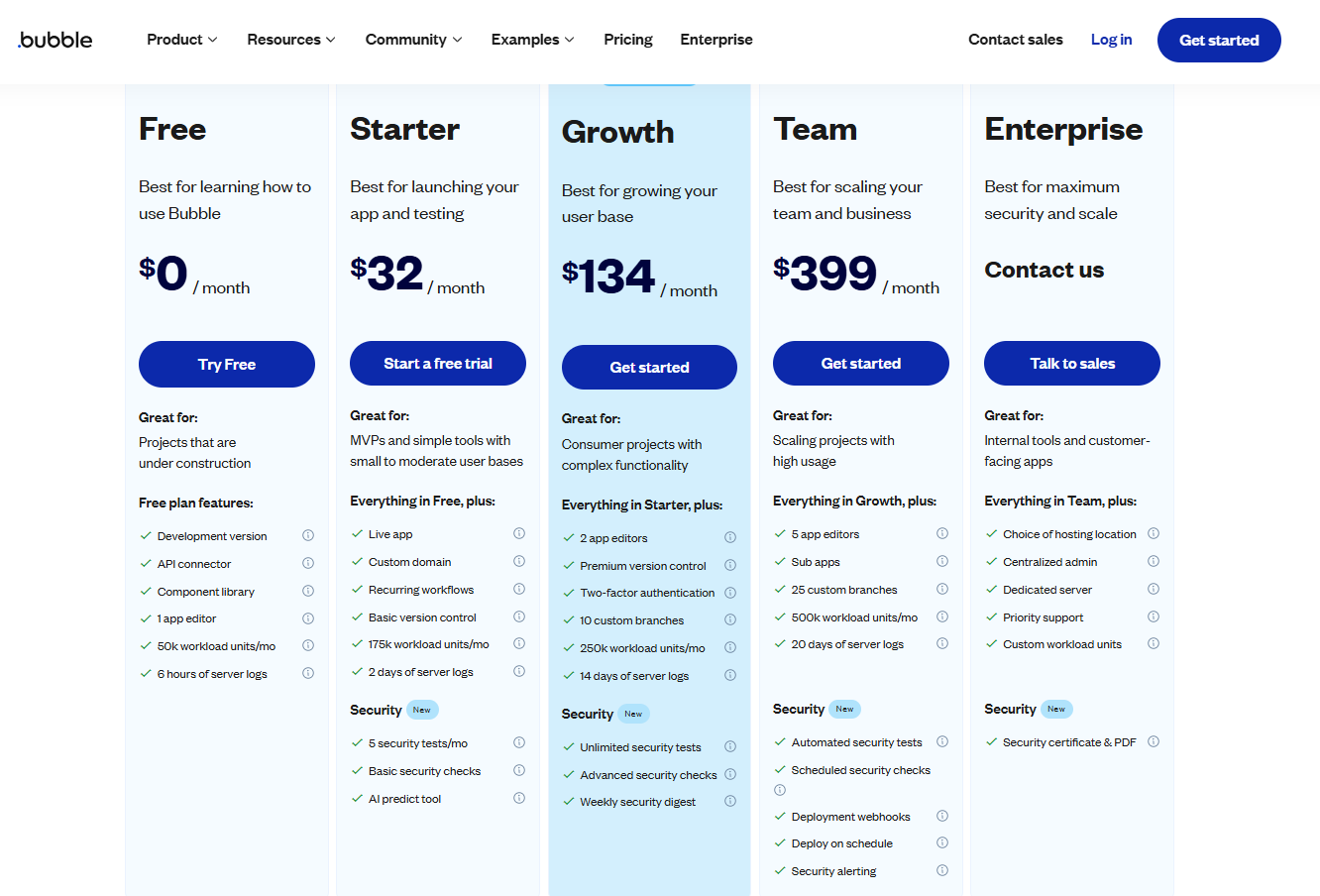
Free tier available. Paid plans start at $32/month, with higher tiers for collaboration, performance, and backend features.
Pros:
✅ Very flexible and customizable
✅ Built-in database & diverse integrations
✅ Ideal for complex apps
✅ Massive community and learning resources
Cons:
❌ Steep learning curve
❌ Not ideal for native mobile apps
❌ You need to pay to launch your app
❌ No code exports
2. Avid – Best for mobile app MVPs
What it is:
Avid is an AI-powered no-code tool that lets you build full mobile apps just by describing what you want to build. No design or tech background needed. You type your idea, and it generates the full app UI and logic instantly.
Who it’s for:
Non-technical founders, solo builders, and anyone who wants to quickly turn an idea into a working mobile app.
Why it’s great:
- Zero learning curve (no tutorials needed)
- AI-first workflow: Just describe your app and Avid builds it for you.
- Instant preview: See your app in a real mobile interface while you build.
- Optimised for speed to MVP
- Native-first mobile apps
Pricing:
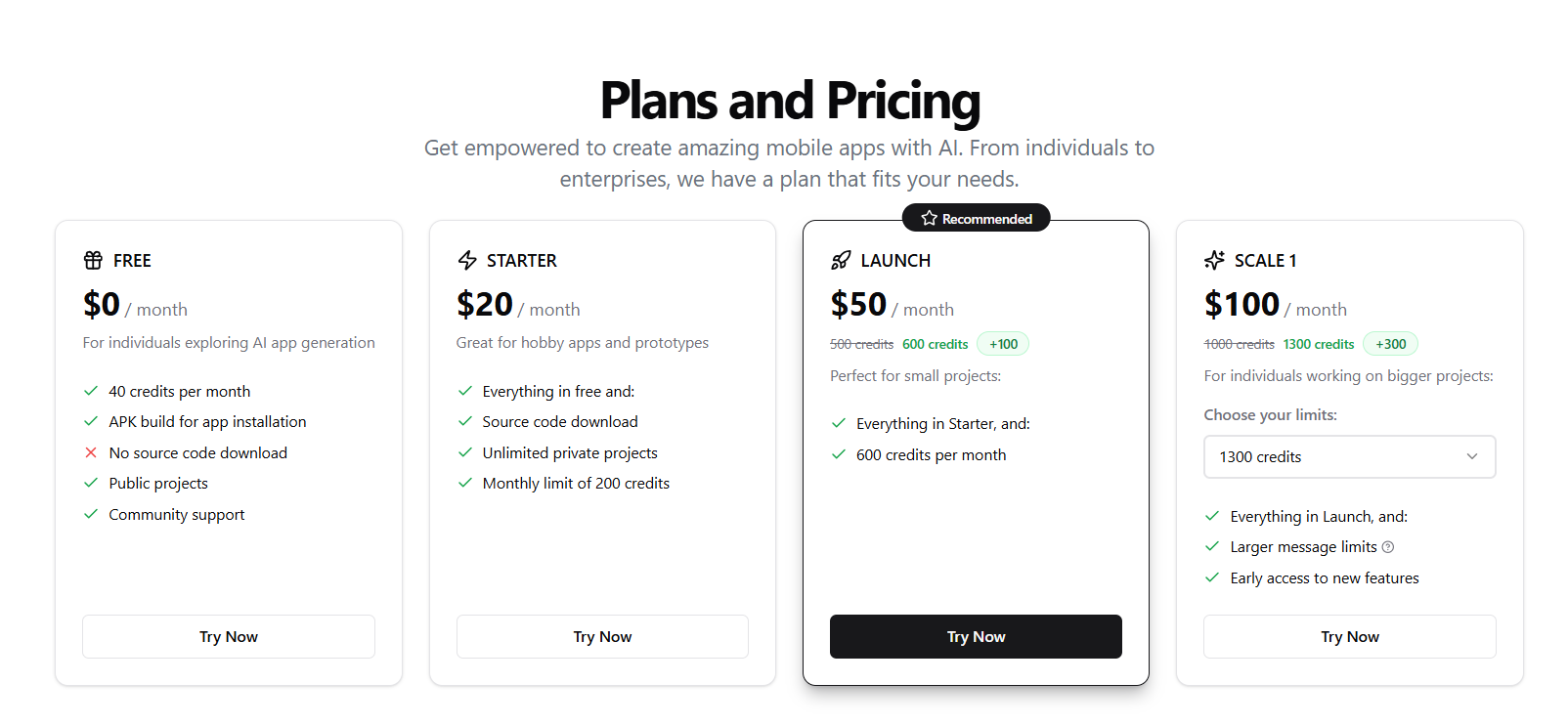
Free tier available. Paid plans start at $20/month to unlock more AI messages and customisation.
Pros:
✅ Easiest learning curve of all listed tools
✅ Fastest way to build MVPs for mobile
✅ Great for idea validation
✅ No design skills needed
✅ Download your APK at any time for free
Cons:
❌ Not ideal for building complex admin dashboards
❌ Still maturing in features like integrations and databases
❌ Not ideal for web apps
3. Adalo – Best for visually designing mobile apps
What it is:
Adalo is a drag-and-drop app builder for creating native mobile and web apps with custom databases and user interactions.
Who it’s for:
Entrepreneurs and creators building mobile apps or internal tools who want a visual editor with some backend capability.
Why it’s great:
- Drag-and-drop UI builder
- Built-in database and simple logic
- App store publishing
- Works for both mobile and web
Pricing:
Free tier available. Paid plans start at $45/month.

Pros:
✅ Great UI editor for mobile apps
✅ Easy to preview and publish to stores
✅ Great for prototyping
Cons:
❌ Can get expensive for scale
❌ Some performance limitations on large apps
❌ No publishing on free tier
❌ No code export
❌ Apps built with Adalo don’t work offline
4. Glide – Best for data-driven web apps
What it is:
Glide lets you build apps directly from a spreadsheet. You upload your data (Google Sheets, Excel, Airtable), and Glide generates a polished mobile or web app instantly.
Who it’s for:
Operations teams, internal tool builders, or solo founders looking to create apps from structured data with minimal logic.
Why it’s great:
- Extremely fast to get started
- Connects to spreadsheets and Airtable
- Tons of beautiful templates
- Easy to deploy and share
Pricing:
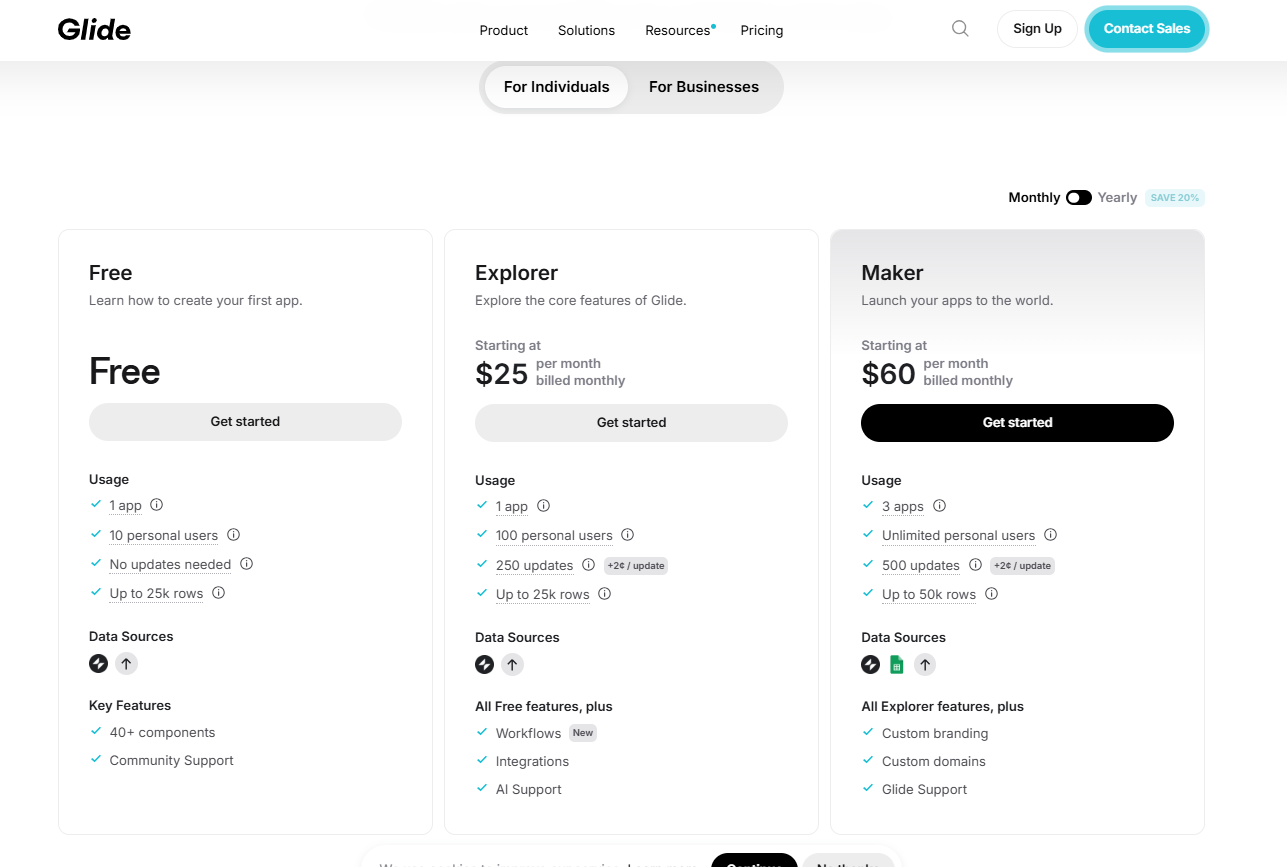
Free tier available. Paid plans start at $25/month for individuals and $249/month for businesses.
Pros:
✅ Fastest setup time for data-based apps
✅ Polished UI with no design work
✅ Great for internal tools
Cons:
❌ Limited flexibility beyond data display
❌ Not ideal for public-facing or feature-rich apps
5. Thunkable – Best for native mobile apps
What it is:
Thunkable is a no-code platform that lets you build native mobile apps with drag-and-drop logic blocks and design components. It’s especially popular in educational settings but powerful enough for solo founders and teams launching to app stores.
Who it’s for:
Thunkable is great for creators, educators, and early-stage founders who want more control than spreadsheet-based tools but don’t want to touch code.
Why it’s great:
- Drag-and-drop interface inspired by MIT App Inventor
- Supports both iOS and Android builds
- Logic blocks for programming behaviour
- One-click publishing to app stores
- Integrates with APIs and databases
Pricing:
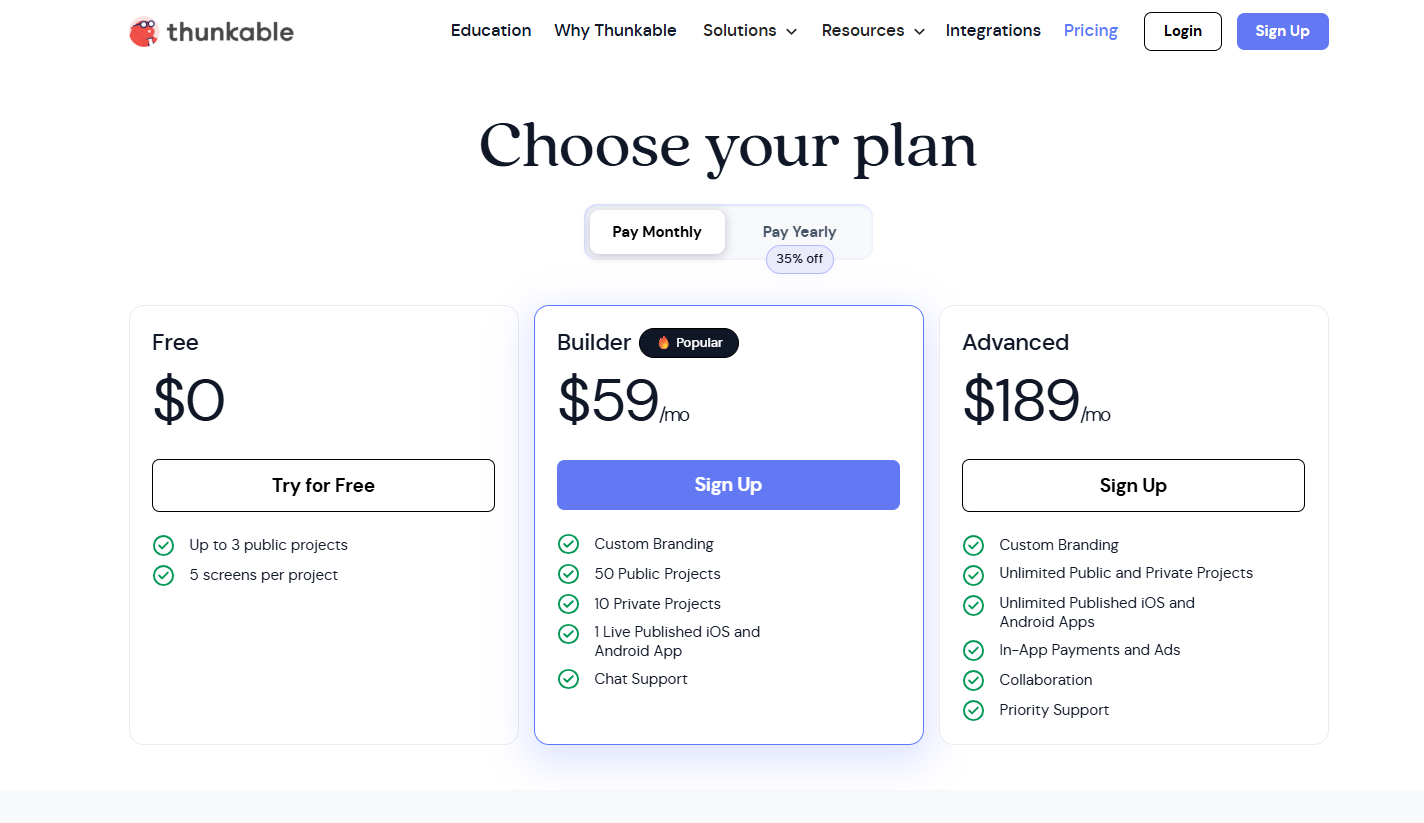
Free plan available with limitations. Paid plans start at $59/month.
Pros:
✅ Simple and intuitive logic builder
✅ Real native app builds
✅ App store deployment made easy
✅ Strong educational community
Cons:
❌ Limited design flexibility
❌ Performance may vary for complex apps
❌ UI can feel less modern than newer tools
❌ No templates to help you get started
❌ Steep learning curve
❌ No backend development tools
❌ More expensive than other options
The Top No-Code Builders Compared
| Features | Bubble | Avid | Adalo | Glide | Thunkable |
|---|---|---|---|---|---|
| Free Tier? | ✅ | ✅ | ✅ | ✅ | ✅ |
| Lowest Paid Tier | $32 | $20 | $45 | $25 | $59 |
| Highest Paid Tier | $399 | $100 | $250 | $249 | $189 |
| Mobile Apps | ✅ | ✅ | ✅ | ✅ | ✅ |
| Speed to MVP | Slow | Fastest | Medium | Fast | Medium |
| AI Assistance | ✅ | ✅ | ✅ (Partial) | ✅ (Partial) | ❌ |
| Code Export | ❌ | ✅ | ✅ | ❌ | ✅ |
| Best For | Complex web apps | Mobile app MVPs | Drag-and-drop mobile apps | Internal tools & dashboards | Native mobile apps |
Choosing the right no-code builder for your first app
The best tool depends on what you’re trying to build and how fast you need to ship:
- Want to launch the MVP of your idea this week? Go for Avid.
- Building an internal tool for your team? Glide is a great choice
- Need heavy backend logic or custom workflows? Go for Bubble.
- Need a visual editor with drag-and-drop? Choose Thunkable or Adalo.
Don’t overthink it. The goal isn’t to build the perfect app on day one. It’s to get something live, test it with real users, and learn fast.
Final thoughts: Just start building
No-code isn’t about cutting corners. It’s about speeding up learning.
You don’t need a dev team or thousands of dollars to validate your idea. You need a working version, a clear goal, and a few users to test with.
Tools like Avid exist so you can go from idea to real app in minutes. That way, you can spend less time building and more time learning.
Want to see what your idea looks like? Start building on Avid